Zodiac Casino App – Download-Free Access in Canada
Canadians don’t have to download any app to sign up and start playing at our Zodiac Casino. You get to access the welcome bundle, which contains 80 Mega Money Wheel spins as well as up to 480 CAD, as well as limited-time bonuses, jackpots, and loyalty rewards.
Download and Installation Info
There are no downloadable apps available for either operating system. Still, newcomers may require an in-depth explanation of how to “download” Zodiac Casino and start playing on the go.
How to Download and Install on Android?
Our casino can be accessed through a Progressive Web App (PWA) because there is no downloadable Zodiac Casino app Android. You need to go to the website using your Chrome browser on any Android device to proceed with the installation. You need to find the “Add to Home Screen” option or open the menu by tapping the three dots at the top right corner to then choose between “Install app” and “Add to Home screen.”
The installation process creates an icon on your home screen that functions like a standard application. The PWA delivers an instant experience that enables users to access all features of the service, including secure login and banking, and complete game library access (6,500+ games). Better yet, the Zodiac Casino app for Android updates itself automatically every time you start it.
Zodiac Casino Download iOS (iPhone and iPad)
Zodiac Casino Canada also offers PWA to users who own iPhones and iPads. The iOS App Store does not have an application available for download. Similarly to what was outlined above, Apple device users need to boot up their Safari browser and head to our site. Then, they need to tap the Share icon, which appears as a square with an upward arrow at the bottom of their screen. Users need to scroll down until they find the option that says “Add to Home Screen.”
Users need to select a name for the shortcut, which they will create (“Zodiac Casino”, for example), before they click on “Add.” The home screen will then display an icon that users can tap to open the casino in a special full-screen browser that works as a dedicated application.
iOS’s PWA optimization provides users with an optimal experience to play slots and table games. All users can manage their accounts with the same performance level and ease as they would have in a native Zodiac Casino iPhone app.
Requirements for Hardware
Even though there’s no Zodiac Casino mobile app download required, you should still take into consideration some hardware requirements.
For Android devices, the operating system should be Android 8.0 (Oreo) or later. This also applies to users looking for Zodiac Casino APK: 30, as the web-based version replaces traditional APK installation files. The progressive application needs the latest version of Google Chrome to function correctly. It also requires users to maintain a stable internet connection through Wi-Fi, 4G, LTE, or 5G networks.
On the iOS side, the operating system needs to be iOS 14.0/ iPadOS 14.0 or higher. The application needs users to use the up-to-date Safari browser for proper installation and optimal performance. Stable interment requirements are similar to what was described above.
All in all, the Zodiac Casino mobile web app was designed to be lightweight and should function on devices meeting these minimums. Here are a few examples of the devices that Canadians used for peak performance:
- Google Pixel 10
- Google Pixel 10 Pro
- Google Pixel 9a
- iPhone 16 / Pro / Pro Max
- iPhone 16 / Pro Max
- OnePlus 15
- Samsung Galaxy S25 Ultra
Pros and Cons of Using our App
The Zodiac Casino PWA functions as a contemporary solution that replaces traditional applications. The following section presents the main advantages and disadvantages:
| Pros | Cons |
| No Download Needed. It opens up instant access to Casino Zodiac without any delays or downloading an application. | No Native Features. Does not provide deeper OS-level integrations, behavior like advanced push notifications or biometric login, which a native Zodiac Casino mobile app would have made available. |
| Cross-Platform. Works seamlessly on both Android (via Chrome) and iOS (via Safari) from a single codebase. | Browser-Dependent. Performance and functionality are tied to the browser’s capabilities and updates. |
| Auto-Updating. If PWA is launched, it will update itself in the background, meaning you always have the latest version. | |
| App-Esque Experience. The system delivers an interface that operates in full-screen mode while providing rapid and responsive performance that mimics the experience of using a native application. | |
| Lightweight & Secure. Doesn’t consume significant storage and runs in a secure browser sandbox. |
Zodiac Casino Application Interface
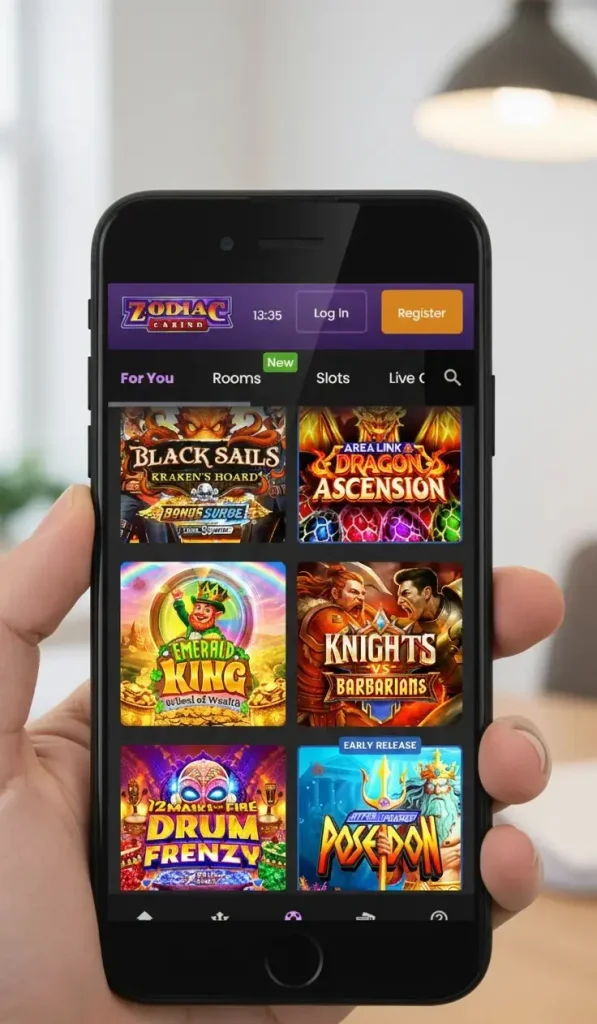
The ZodiacCasino app shows off its dark-styled interface through its bold design, which uses purple and black colors to create high visual contrast. At the very top, the logo is positioned on the left, while deposit and profile buttons sit clearly on the right in contrasting purple and orange, making account access immediately visible.
The horizontal navigation bar, which appears under the header, displays different categories. They include, for instance, Slots, Live Dealer, Tables, Video Poker, and Variety. The search icon, which provides direct access to the search function, is positioned at the rightmost edge of this interface.
The main screen displays a grid, which showcases colorful game thumbnails arranged in perfectly spaced horizontal rows. Each tile displays in a large size with bright colors and extensive details, while some show minor corner labels, which say “New” and “Early Release” to indicate special status.
A navigation bar, which remains fixed at the bottom of the screen, displays 5 different icons with clear labels: Promotions, Loyalty, Games, Bank, Help. Each section can be reached with a single tap.
Security and Data Protection in the Application
The PWA is designed with security as a top priority, addressing common concerns about mobile gaming safety. Our Zodiac Casino app uses SSL/TLS 256-bit encryption to secure all data transmissions, which matches the protection standard used by major financial institutions. The program operates over secure HTTPS protocols, which protect all login credentials and personal details together with financial transactions through encryption methods.
The app also uses advanced firewall systems together with secure server infrastructure and regular security audits to create protection measures against unauthorized access. The PWA operates within the secure sandbox environment of your browser. It uses built-in browser security features that work with automatic updates to decrease security vulnerabilities as you always use the most recent, most protected version.
Zodiac Casino App PC
The PC iteration of the app also functions as a PWA. It enables desktop users to experience an application interface without needing to download traditional software (EXE files). When you open the site in modern browsers such as Chrome or Edge, you may notice a small download/install icon in the address bar.
Zodiac Casino download for PC happens instantaneously after you click that button. It opens a lightweight, standalone window that runs separately from your browser tabs after it creates its own shortcut and taskbar icon.
The desktop PWA delivers fast loading times while it maintains automatic system updates and protects data through secure HTTPS encryption, and enables complete access to all game and banking as well as account functions.
How to Use the Zodiac Casino App?
Our application provides a user-friendly experience right off the bat and requires no special training to operate. First, you must complete the Zodiac Casino app download and open the installed PWA from your home screen.
New players will need to tap the registration button to complete their account creation process through the sign-up form. Existing users can log in securely with their credentials. After accessing your profile, navigate to the banking section to make a deposit and claim any available bonuses.
The bottom menu allows you to browse game categories and select a title for immediate launching. Your account dashboard provides you with the ability to manage your settings and track your withdrawals and loyalty rewards at any time.